
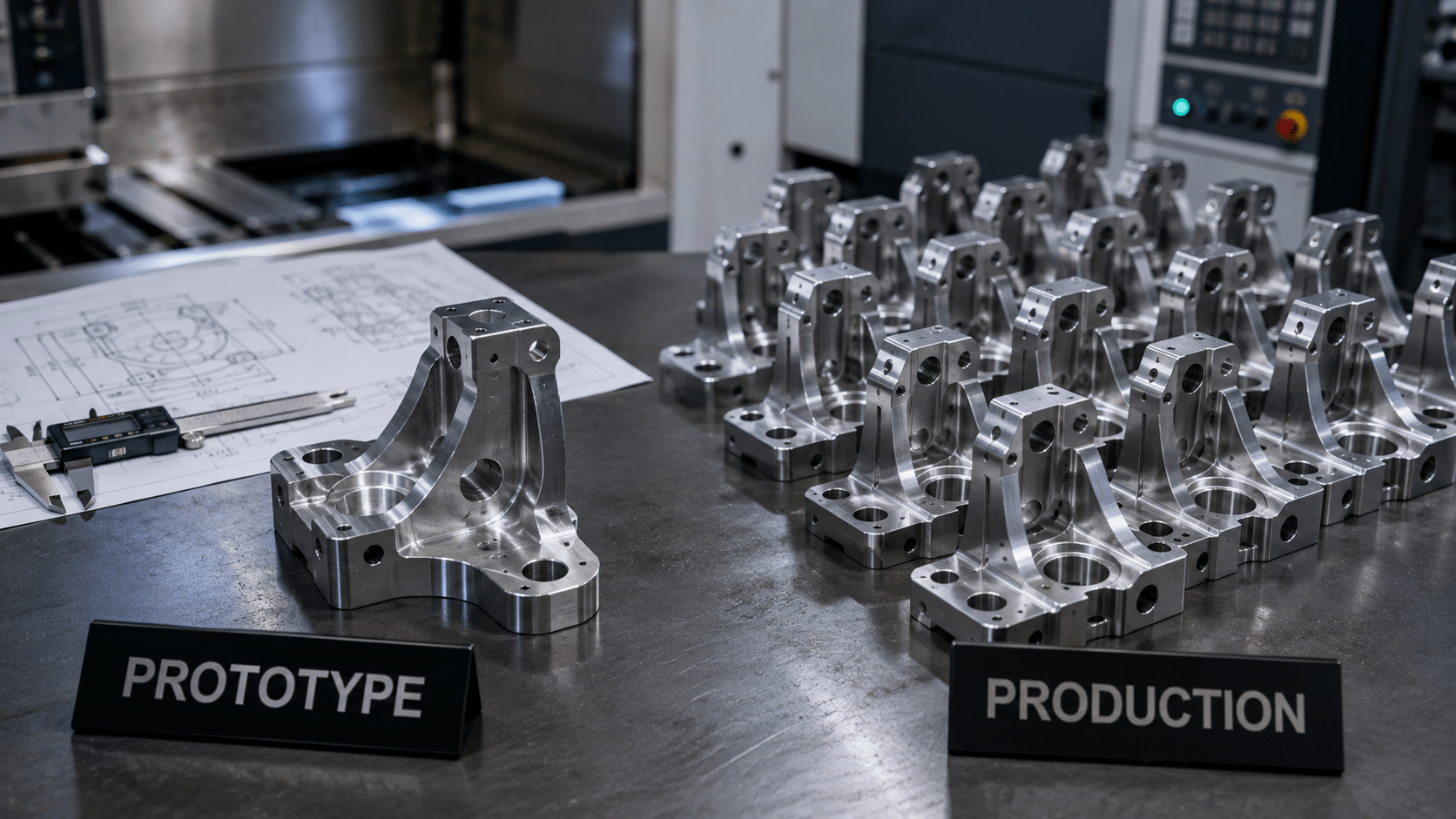
Hay una pregunta que me hacen constantemente: “¿El CNC sirve para prototipos o para la producción?”. Y la respuesta sincera es: sí. Para ambas cosas. La misma máquina que el martes corta una sola pieza de prueba de concepto puede producir un lote de 2.000 el miércoles. Lo que realmente cambia entre ambos casos no es la máquina. Es la cantidad de tiempo y dinero que se invierte en la puesta a punto antes de que empiecen a salir las virutas, y cómo se reparte ese coste entre las piezas que se fabrican.
Si no distingues bien entre ambas fases, acabarás pagando de más. Si encargas un “prototipo” cuando en realidad necesitas precios de producción, el coste por pieza seguirá siendo altísimo. Si preparas las herramientas para la “producción” con un diseño que aún está cambiando, habrás gastado dinero en optimizar una pieza que estás a punto de rediseñar. Esta guía explica en qué se diferencian realmente el mecanizado de prototipos y el de producción —coste, rapidez, tolerancias, volumen— y, lo que es más útil, cómo saber en qué fase se encuentra realmente tu proyecto. Porque esa es la decisión que te permite ahorrar o malgastar dinero de verdad.
Respuesta rápida: El mecanizado CNC de prototipos permite fabricar una o unas pocas piezas rápidamente para validar un diseño, por lo que el coste por pieza es elevado, ya que los gastos de preparación no se reparten. El mecanizado CNC de producción trabaja con lotes más grandes, con sistemas de sujeción y programación optimizados, lo que reduce el coste por pieza. Las máquinas son las mismas; la diferencia radica en cuánto se invierte en la configuración inicial y en el número de piezas entre las que se amortiza dicha inversión.
El único coste que lo explica todo
Antes de comparar ambas cosas, necesitas esa idea única que haga que todo encaje: coste fijo de instalación frente al coste por pieza.
Cada trabajo de mecanizado conlleva un coste único: la creación y comprobación de la trayectoria de la herramienta, la construcción o el ajuste del dispositivo de sujeción y la configuración de las compensaciones. Llámalo «configuración». Luego está el coste que se repite en cada pieza: el tiempo de máquina necesario para cortarla, más el material. Ahora fíjate en lo que ocurre con las cuentas. En un único prototipo, todo el coste de configuración recae sobre esa única pieza, por lo que su precio parece desorbitado. Si repartes esa misma configuración entre 500 piezas, apenas se nota por unidad. Esa es toda la historia. El prototipo y la producción no son tecnologías diferentes, sino puntos distintos en esa curva de amortización. Si quieres conocer todos los detalles de un presupuesto, nuestra guía básica sobre qué es el mecanizado CNC y cómo funciona sienta las bases.
Mecanizado CNC de prototipos: rápido, flexible, pero caro por pieza
El mecanizado de prototipos tiene un único objetivo: ponerte rápidamente en las manos una pieza real y funcional para que puedas probarla. La rapidez y la flexibilidad son más importantes que el coste unitario, ya que, de todos modos, vas a modificar el diseño.
Las concesiones tienen sentido una vez que se ve el objetivo. La puesta a punto es rápida y mínima, ya que no se optimiza para una producción que quizá nunca llegue a realizarse. La programación es rápida, la fijación de piezas es sencilla y, si la pieza necesita tres revisiones en dos semanas, que así sea: no se ha invertido en exceso. El coste que se paga es el precio por pieza: al repartirse la configuración entre tan solo unas pocas piezas, cada una resulta cara. Pero en esta fase no se compran piezas baratas. Se compra rapidez y libertad para iterar.
El mecanizado de prototipos resulta especialmente útil cuando el diseño aún está en fase de desarrollo, cuando se necesitan piezas para realizar pruebas de ajuste y funcionamiento, o cuando hay que cumplir un plazo para una demostración o un hito de financiación. Además, es la forma de reducir los riesgos antes de invertir dinero real en el utillaje de producción.
Mecanizado CNC en serie: optimizado, repetible y económico por pieza
El mecanizado en serie da un giro completo a las prioridades. Ahora que el diseño está cerrado, el volumen es real y el objetivo principal es reducir el coste por pieza, manteniendo la calidad totalmente estable a lo largo de toda la tirada.
Esto justifica una inversión que habría sido un derroche si se hubiera destinado a un prototipo. El taller fabrica utillajes específicos para que las piezas se carguen rápidamente y de forma idéntica. Los programadores optimizan las trayectorias de las herramientas para reducir el tiempo de ciclo, recortando segundos que se acumulan a lo largo de miles de piezas. Los procesos se validan para que la calidad se mantenga pieza tras pieza, y la inspección pasa a basarse en muestreos o en el control estadístico de procesos (SPC), en lugar de comprobar cada dimensión a mano. Todo ese esfuerzo inicial cuesta dinero, pero, repartido entre un lote grande, reduce drásticamente el precio por pieza y te proporciona la consistencia necesaria para fabricar un producto.
La producción es la decisión acertada una vez que el diseño está cerrado, el volumen justifica la inversión en la puesta en marcha y la calidad constante es más importante que el plazo de entrega de la primera pieza.
Prototipo frente a producción: comparación lado a lado
| Factor | Prototipo | Producción |
| Volumen | 1–50 unidades | De cientos a miles |
| Inversión inicial | Mínimo | Amplio y optimizado |
| Coste por pieza | Alta | Bajo |
| Plazo de entrega (primeras piezas) | Rápido | Tarda un poco en arrancar, pero luego va rápido |
| Flexibilidad de diseño | Alto — se prevén cambios | Bajo — diseño congelado |
| Fijación | Sencillo, genérico | Especializado, a medida |
| Inspección | A menudo, 100% en las primeras piezas | Muestreo / SPC |
| Ideal para | Pruebas, iteraciones, demostraciones | Fabricación comprometida y repetible |
La tabla deja claro el patrón. No se trata de servicios que compiten entre sí y entre los que hay que elegir una sola vez, sino de etapas secuenciales por las que pasan la mayoría de los proyectos. Se crea un prototipo para perfeccionar el diseño y, a continuación, se pasa a la fase de producción para fabricarlo de forma rentable. La clave está en saber cuándo se ha pasado de una etapa a la otra, y de eso trata la siguiente sección.
Cómo saber en qué etapa te encuentras
Olvídate de las etiquetas y responde a tres preguntas directas.
- ¿Ya está terminado el diseño? Si aún es posible que cambies una dimensión, una característica o un material, estás en fase de creación de prototipos: no pagues por optimizar un objetivo en constante evolución.
- ¿Tienes volumen de verdad? La inversión en la puesta a punto solo se amortiza con el volumen de producción. Si necesitas 10 piezas, no tiene sentido invertir en utillaje de producción; si necesitas 5.000, prescindir de él es dejar de ganar dinero.
- ¿Qué es más importante en este momento: la rapidez o el coste unitario? Lanzar una demo es sinónimo de prototipo. Lanzar un producto con margen es sinónimo de producción.
La mayoría de los proyectos siguen este proceso en el orden indicado: unas cuantas iteraciones del prototipo para definir el diseño y, a continuación, el paso a la producción una vez que este se ha fijado y se ha confirmado el volumen. Nuestro análisis comparativo más detallado de Mecanizado CNC para prototipos frente a piezas de producción explica el proceso de transición con más detalle, y merece la pena leerlo antes de tomar una decisión en un sentido u otro.
Cuando otro proceso supera al mecanizado de producción
Una observación más sincera. Cuando los volúmenes son muy elevados, el mecanizado de cada pieza puede dejar de ser la opción más económica. Si se fabrican decenas de miles de piezas de plástico idénticas, el moldeo por inyección resultará más rentable que el mecanizado una vez amortizado el coste del molde, y ese es precisamente el razonamiento que subyace a nuestro servicio de moldeo por inyección. Y en el caso de las piezas que combinan un cuerpo moldeado con un inserto metálico, sobremoldeado puede sustituir lo que, de otro modo, sería un conjunto mecanizado. El mecanizado sigue siendo la opción ideal para piezas metálicas, geometrías complejas, tolerancias estrictas y volúmenes bajos o medios; sin embargo, parte de una buena planificación de la producción consiste en saber cuándo recurrir a un proceso totalmente diferente. Si no estás seguro de en qué punto tu volumen marca la diferencia, envía la pieza a través de nuestro Servicio de mecanizado CNC y te lo diremos sin rodeos.
Preguntas frecuentes
¿Cuál es la diferencia entre el mecanizado CNC de prototipos y el de producción?
Utilizan las mismas máquinas, pero las optimizan para objetivos diferentes. El mecanizado de prototipos permite fabricar una o unas pocas piezas rápidamente con una configuración mínima, por lo que el coste por pieza es elevado, pero se obtienen las piezas con rapidez y se puede modificar el diseño con total libertad. El mecanizado de producción invierte en sistemas de sujeción y programación optimizados para producir grandes lotes a un bajo coste por pieza y con una calidad constante.
¿Es el mecanizado CNC adecuado para la fabricación de prototipos?
Sí. El mecanizado CNC es ideal para prototipos porque no requiere utillaje específico: el mismo programa que fabrica una pieza sirve para fabricar mil. Se obtiene rápidamente una pieza real y funcional en el material definitivo, lo cual es ideal para realizar pruebas de ajuste y funcionamiento, así como para iteraciones de diseño, antes de dar el paso a la producción.
¿Cuándo debo pasar del mecanizado de prototipos al de producción?
Cambia a la fase de producción una vez que el diseño esté definitivo, el volumen justifique la inversión en la puesta a punto y la calidad repetible sea más importante que el plazo de entrega de la primera pieza. Si aún existe la posibilidad de que cambies el diseño, sigue en la fase de prototipado: optimizar un objetivo en constante cambio supone un derroche de dinero. Un volumen real y consolidado es la señal de que la puesta a punto de la producción resultará rentable.
¿Por qué el mecanizado de prototipos resulta más caro por pieza?
Porque el coste único de puesta a punto —programación, montaje de utillajes y ajuste del trabajo— recae únicamente en unas pocas piezas. En producción, esa misma puesta a punto se distribuye entre cientos o miles de piezas, por lo que apenas afecta a cada unidad. En un prototipo, lo que pagas es por la rapidez y la flexibilidad, no por un precio unitario barato.
¿Puede una misma máquina CNC servir tanto para la fabricación de prototipos como para la producción?
Sí. La máquina no cambia entre la fase de prototipo y la de producción; lo que cambia es la cantidad que se invierte en la puesta a punto y el número de piezas sobre el que se amortiza. Un taller puede fabricar un único prototipo y, posteriormente, llevar a cabo la producción completa de la misma pieza con el mismo equipo, y es por eso por lo que el CNC se adapta con tanta facilidad de una fase a otra.
________________________________________
Sobre el autor
Equipo de Ingeniería de Precisión de Lewei Es un escritor especializado en fabricación y experto en procesos CNC que ha presupuestado y fabricado miles de piezas mecanizadas, desde prototipos únicos hasta series completas de producción. Escribe guías prácticas y centradas en los costes que ayudan a los ingenieros y a los responsables de compras a tomar la decisión de fabricación adecuada en el momento oportuno, y a evitar pagar por una opción errónea.

 English
  简体中文
简体中文  Español
  Deutsch (Sie)
  日本語
日本語  Português