 Skip to content

Have you ever sent a design for CNC milling only to get back parts that cost too much or don’t fit right? Many designers face this issue. CNC milling uses computer-controlled tools to cut precise shapes from metal or plastic blocks. Bad designs cause vibrations, tool breaks, or extra steps that raise prices.
In this guide, you will learn simple yet powerful design rules for CNC milling parts. We cover basics like wall thickness and corners, plus advanced tips on 5-axis machining and undercuts. These rules help you create parts that machine fast and work well in real use. Good designs can cut costs by 20-40% and reduce errors, based on 2025-2026 industry reports from sources like Manufacturing Tomorrow and Best in Parts. Follow along to make better choices for your projects in aerospace, automotive, medical, and more. When ready, try a CNC milling service for quick feedback on your files.
What Is CNC Milling and Why Design Rules Matter?
CNC milling is a subtractive manufacturing process where a computer-controlled machine uses rotating cutting tools to remove material from a solid block (called a workpiece or stock) until the desired part shape is achieved. You start with a piece of metal, plastic, or composite—often a rectangular billet—and the machine precisely carves away excess material layer by layer or in programmed paths.
This method produces highly accurate, repeatable parts with excellent surface finishes and tight tolerances, making it ideal for prototypes, low-to-medium volume production, and complex geometries in industries like aerospace, automotive, medical devices, and electronics.
How the Process Works Step by Step
The modern CNC milling process in 2026 follows a clear sequence, blending digital design with physical machining:
- Create a CAD Model — You design the part in 3D CAD software (like SolidWorks, Fusion 360, or Onshape). This digital model defines every dimension, feature, and tolerance.
- Generate CAM Instructions — CAM (Computer-Aided Manufacturing) software converts the CAD model into toolpaths. It calculates which tools to use, spindle speeds, feed rates, depths of cut, and movement sequences. This outputs G-code (or similar machine-readable instructions) that tells the CNC mill exactly what to do.
- Machine Setup — The operator secures the raw material on the machine table using vises, clamps, vacuum fixtures, or custom soft jaws. Tools (end mills, ball mills, drills, etc.) are loaded into the spindle or tool changer. The machine is zeroed (reference points set) so movements align perfectly with the CAD coordinate system.
- Machining Execution — The spindle spins (typically 1,000–20,000+ RPM depending on material and tool) while the table (or spindle in some machines) moves in X, Y, and Z axes (plus rotations in 4/5-axis setups). The tool removes material in roughing passes (heavy material removal) followed by finishing passes (light cuts for smooth surfaces). Coolant or mist floods the cutting zone to reduce heat, flush chips, and extend tool life.
- Inspection and Finishing — After machining, the part is deburred, measured (using calipers, CMMs, or gauges), and often post-processed (anodizing, passivation, bead blasting, etc.).
In 2026, advancements like AI-native toolpath optimization, digital twins for real-time simulation, and hybrid mill-turn centers make the process smarter—predicting tool wear, adjusting feeds automatically, and minimizing setups.
Coolant plays a critical role: it prevents built-up edge on tools (especially in aluminum), controls thermal expansion, and clears chips to avoid recutting or tool jamming.
Why Design Rules Matter (and Why They Help You)
Design rules exist because CNC milling has physical and mechanical constraints. The process excels at precision but punishes designs that ignore tool physics, machine limits, or material behavior.
- Rules match real machine capabilities — Tools are round, so sharp internal corners are impossible without secondary operations (like EDM or wire cutting), which add cost and time. Thin walls vibrate under cutting forces, causing poor surface finish, dimensional errors, or tool breakage.
- They prevent common problems — Sharp corners concentrate stress on tools, leading to chipping or rapid wear. Deep pockets trap chips and heat, warping parts or dulling cutters. Overly tight tolerances everywhere force slower speeds, more inspections, and higher scrap rates.
- They deliver real benefits — Following rules can reduce machining time by 20–50%, cut tool consumption, lower material waste, and improve part strength. In automotive transmission housings, optimized pocket depths and radii have slashed cycle times by 35% while maintaining tight bore alignments.
- Economic impact — Poor designs inflate costs through extra setups, special tooling, rework, or even full redesigns. A 2025–2026 industry analysis shows that DFM (Design for Manufacturability) adherence reduces overall part cost by 20–40% and lead times significantly.
Pro Tip — Always start thinking about tool size early in design. Larger diameter, shorter tools (higher rigidity) cut faster, produce better finishes, and cost less per part. A 1/2-inch end mill removes material much quicker and with less deflection than a 1/8-inch one—use the biggest practical tool whenever geometry allows.
When you apply these rules from the start, your parts machine reliably, arrive on time, and perform as intended. If you’re preparing a design, consider running it through a CNC milling service for instant DFM feedback—it catches issues before you commit to production.
Main Restrictions in CNC Milling Design
CNC milling gives you a lot of design freedom, but it has built-in limits from the tools, the machine, and how material is removed. These restrictions come from physics and mechanics—not software or imagination. Ignoring them leads to redesigns, extra costs, tool breaks, poor finishes, or parts that can’t be made at all. Understanding them early saves time and money.
The two biggest categories of restrictions are tool geometry (what the cutter physically can and cannot do) and tool access (whether the tool can physically reach the spot it needs to cut). In 2026, even with advanced 5-axis machines and AI-optimized paths, these core limits still apply.
Tool Geometry Limits
Most CNC milling tools—end mills, ball mills, drills—are cylindrical. The cutting edges follow a round path. This shape directly transfers to your part.
- Sharp internal corners are impossible with standard tools — Every internal corner will have a radius at least equal to the tool’s radius (or tip radius). A 1/4-inch (6.35 mm) end mill leaves a minimum 1/8-inch (3.175 mm) radius in the corner. A perfectly sharp 90-degree internal corner would require a square or 90-degree-profile tool, which doesn’t exist in rotating CNC tooling.
- Why this happens — The tool spins around its center axis. It can’t cut a sharp inside edge without leaving a fillet. Trying to force a smaller radius than the tool diameter means using a tiny, fragile cutter, which deflects, vibrates, breaks easily, and slows production dramatically.
- Practical impact — In pockets or cavities, all inside vertical edges get rounded. Sharp corners concentrate stress on the tool tip, causing chipping, rapid wear, or chatter marks on the part. In harder materials like stainless or titanium, this accelerates tool failure.
- Workarounds and best practice — Design internal radii at least 1–1.3 times the expected tool radius (common recommendation in 2025–2026 guides). For example, plan for a 0.125-inch radius if using a 1/4-inch end mill—this allows the tool to sweep through the corner smoothly without stopping or overloading. If you need apparent sharpness for fit or looks, use dogbone (or T-bone) relief cuts: extend the pocket slightly at the corners so a larger tool can reach in and leave only a tiny witness line.
- Real example — In medical device housings with tight internal pockets, designers initially specified 0.010-inch corner radii. Shops had to switch to micro-tools, which broke frequently and tripled cycle time. Switching to 0.050-inch radii allowed standard 1/8-inch end mills, cut time by 40%, and improved surface finish.
Pro Tip — Always oversize internal radii slightly beyond the tool radius. This lets the CAM software generate circular entry/exit moves instead of sharp 90-degree turns, reducing vibration and improving tool life by 30–50% in many cases.
Tool Access Issues
The tool must physically reach every surface it needs to cut. In basic 3-axis milling, the cutter approaches mostly from above (top-down line-of-sight). Anything hidden below an overhang, behind a wall, or deep inside a narrow channel creates problems.
- Line-of-sight limitation — Standard vertical mills can’t reach features unless there’s a clear vertical or near-vertical path from the tool approach direction. Deep cavities, enclosed pockets, or features on multiple non-adjacent faces require the part to be flipped and re-setup—each flip adds alignment error (typically 0.001–0.005 inches) and time.
- Deep features and reach problems — Long tools needed for deep pockets lose rigidity. Deflection increases with length (rule of thumb: keep tool length < 4–5× diameter to avoid chatter). Narrow deep slots or holes amplify this—tool bend causes taper, poor finish, and out-of-tolerance bores.
- Undercuts and overhangs — Features where material “overhangs” the opening (like internal grooves or T-slots) block direct access. The tool shank is wider than the cutting diameter, so it can’t fit through small openings to reach hidden areas. This requires special tools (T-slot cutters, lollipop mills, dovetail cutters) or 5-axis capability.
- Why flips and special tools hurt — Multiple setups accumulate tolerance stack-up. Special tools are expensive, wear faster, and need precise programming to avoid collisions. In high-volume runs, extra setups can add hours per batch.
- When 5-axis helps (and when it doesn’t) — 5-axis machines tilt and rotate the tool or part, giving access to angled or undercut features in one setup. But even 5-axis has limits: very deep narrow cavities still need long tools (deflection risk), and extreme undercuts may still require EDM or assembly instead. 5-axis also costs more per hour and needs advanced CAM.
- Real example — An aerospace bracket had internal undercuts for weight reduction. In 3-axis, it needed 4 setups and lollipop tools—cycle time 45 minutes per part, frequent breaks. Redesigned for 5-axis simultaneous machining: single setup, standard ball mills, cycle time down to 18 minutes, better finish, zero tool failures.
Pro Tip — Design with “tool access clearance” in mind: maintain at least 10–15° approach angle for the tool holder and spindle nose. Avoid nesting deep features inside other deep features without relief cuts or access windows. For complex parts, run a quick toolpath simulation in CAM early—if it shows red collision zones or requires excessive long-reach tools, simplify the geometry.
Knowing these two main restrictions—tool geometry and tool access—lets you design parts that machines love instead of fight. When you respect them, quotes drop, lead times shrink, and parts come out right the first time. If your design pushes these limits, upload it to a CNC milling service for instant DFM feedback—they’ll flag geometry issues before you order tools or material.
CNC Design Guidelines for Better Parts

Follow these guidelines to create parts that are easy, fast, and affordable to mill. They come from real shop experience and current 2026 standards from services like Protolabs, Hubs (now Protolabs Network), HLH Rapid, and others. When you design with these in mind, you avoid common problems like tool breakage, poor finish, extra setups, and high costs. Shops can run your parts smoother, and you get better results in less time.
These tips cover the most important features: cavities and pockets, internal edges and corners, thin walls, holes, threads, small features, tolerances, and text/lettering. Apply them early in your CAD work.
Cavities and Pockets
Cavities and pockets are recessed areas in your part. Keep them simple to machine well.
Keep pocket depth shallow—ideally under 4 times the pocket width (depth-to-width ratio of 4:1 or less). Many shops recommend 3:1 to 4:1 as safe for standard machining; going deeper increases tool deflection, chip buildup, and heat issues.
Deep pockets trap chips and heat up the tool and part, causing warping, poor surface finish, or tool wear. In harder materials like stainless steel, this leads to faster tool failure.
- Use stepped depths for very deep areas: rough out in layers, stepping down gradually to keep tool engagement low and control heat.
- Add radii to pocket floors and walls: match them to your tool size (at least 1/3 of depth recommended) for smooth tool paths and better chip evacuation.
In medical device housings, designers switched from deep single pockets to stepped shallow ones with proper floor radii. Cycle time dropped by about 30%, and parts stayed flat without extra straightening.
Pro Tip: For pockets deeper than 4x width, widen the top opening or add access windows. This lets larger, stiffer tools reach the bottom without long-reach fragile ones.
[Suggest image/infographic: Side-view diagram comparing a 4:1 depth pocket vs. a stepped deep pocket with tool paths shown]
Internal Edges and Corners
Internal edges are where walls meet inside pockets or features. Sharp inside corners cause big problems.
Add curves (radii) to all inside corners. Match the radius to your tool size—aim for at least 1/3 of cavity depth or 1–1.3 times the tool radius (e.g., 1 mm radius if using a small 3 mm tool; many guides recommend 1.3x tool radius as best practice).
Pros: Less tool wear, smoother finishes, reduced vibration, and longer tool life.
Cons: Slightly changes the sharp look—if you need apparent sharpness for fit or assembly, use dogbone (or T-bone) relief cuts: extend small circular pockets at corners so a larger tool can clear the full edge, hiding the extra cut inside.
A robotics company redesigned brackets with 1.3x tool radii instead of tight corners. Tool breakage halved, and surface quality improved—no more chatter marks on mating faces.
Expert Advice: For dogbone fillets, center them at a distance √(R² / 2) from the corner for the cleanest, least visible clearance.
Thin Walls
Thin walls are tall or narrow sections that flex under cutting forces.
Make walls thick enough: metals (like aluminum or stainless) need at least 0.8 mm minimum; plastics (ABS, nylon, PEEK) need 1.5 mm or more. Some sources note feasible down to 0.5 mm in aluminum under ideal conditions, but 0.8 mm is the reliable baseline.
Tall thin walls vibrate—add ribs, gussets, or taper them wider at the base for stiffness. Thin walls also warp from heat during machining or residual stress after unclamping.
In aerospace brackets, engineers used 0.8 mm walls with internal rib supports. The parts held tight tolerances (±0.05 mm) and passed vibration tests without distortion.
Pro Tip: Keep height-to-thickness ratio under 4:1–5:1 for most metals (up to 10:1 possible with care). If pushing thinner for weight savings (e.g., 0.5 mm in aluminum), use light “whisper” cuts, adaptive toolpaths, and rigid fixturing.
Holes
Holes join parts or mount fasteners. Design them for standard tools.
Use common drill sizes like 3 mm, 6 mm, or imperial equivalents—shops stock these, so no custom tools needed. Limit depth to 4 times diameter for easy, accurate drilling (some allow up to 10x with peck cycles; beyond that, consider gun drilling or boring).
- Add chamfers (45° bevels, 0.2–0.5 mm) at hole entries for clean deburring and easy bolt insertion.
- Blind holes need flat bottoms—use end mills or flat-bottom drills instead of pointed twist drills (standard drills leave conical bottoms).
Automotive fittings with standard hole sizes and 4:1 depth machined 25% faster—no special peck cycles or gun drills required.
Expert Advice: For depths over 10x diameter, consider peck drilling or switch to boring/reaming for precision. Very deep small holes may need EDM if tolerances are tight.
Threads
Threads let parts screw together securely.
Start with larger sizes like M6 or bigger—smaller threads (M3 and below) are fragile, slow to tap/mill, and risk breakage. M6 is often the recommended minimum for reliable CNC threading.
Make thread length 3 times the diameter for good strength without wasting time on extra depth (minimum 1.5x diameter; 2–3x is common effective range).
- Use taps for simple, through-hole jobs in softer materials.
- Mill threads for custom pitches, blind holes, or when you need precise control.
In engine blocks, proper thread depths (3x diameter) prevented stripping during high-torque assembly—no more rework on the line.
Pro Tip: For aluminum or soft metals, consider Helicoil inserts if threads see heavy use—they add strength without oversized holes. Add unthreaded run-out (1.5x diameter) at the bottom of blind holes to avoid tap bottoming.
Small Features
Small pins, slots, or protrusions under 2.5 mm cause headaches.
Avoid features smaller than 2.5 mm—tiny tools break easily, deflect, and require very slow speeds.
- Enlarge features if the function allows.
- Use separate assembly (press-fit pins, inserts) for tiny details.
Electronics fixtures originally had 1.5 mm pins. Shops skipped them and used threaded inserts instead—saved cost and avoided frequent tool changes.
Expert Advice: If small features are unavoidable, group them and use micro-milling strategies—but expect higher quotes and longer lead times.
Tolerances
Tolerances tell how close dimensions must be.
Use ±0.1 mm (about ±0.004 inches) for most features—it’s standard and cheap.
Tight tolerances like ±0.02 mm (or tighter) cost more: slower feeds, more inspections, higher scrap risk. Apply tight specs only to critical mating surfaces or fits.
In 2025–2026 reports from machining services, over-specifying tight tolerances across the whole part raised costs 30–50% without improving function.
Pro Tip: Use GD&T (geometric dimensioning and tolerancing) to control only what’s needed—loosen non-critical areas to standard tolerances.
Text and Lettering
Text marks parts for identification, serial numbers, or instructions.
Make text big—at least 5 mm high (16–20 point font) for clear milling and legibility.
Use recessed (engraved) text—it’s faster than raised (less material removal). Sans-serif fonts (Arial, Helvetica) mill cleanly without thin serifs breaking.
Place text on flat, accessible surfaces—avoid curves unless using 4/5-axis.
Medical tools with 5–6 mm recessed sans-serif text stayed readable after sterilization and improved part tracking in hospitals.
Expert Advice: Depth 0.3–0.5 mm is enough for durability without slowing the program too much.
These guidelines make your parts mill-friendly. Start with them in CAD, and you’ll see faster quotes, shorter lead times, and fewer surprises. For quick checks, upload your design to a CNC milling service—they provide free DFM feedback to catch issues early.
CNC Machine Setups and Part Orientation
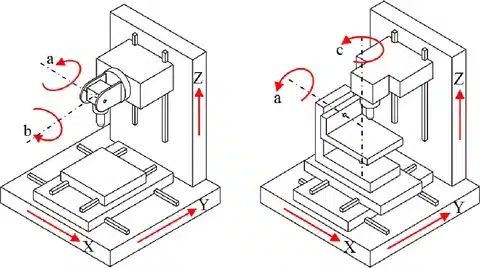
Setups are one of the biggest drivers of machining time and cost. Every time you flip a part, re-clamp it, or change its orientation on the table, you add time, risk alignment errors, and increase the chance of scrap. Good design makes setups simple—ideally one or two at most—so the machine can run efficiently with minimal operator intervention.
The goal is to design parts that can be machined mostly (or entirely) from one primary orientation, or with logical, repeatable flips. This reduces cumulative tolerance stack-up, shortens lead times, and lowers quotes.
Why Setups Matter So Much
Each setup requires:
- Removing the part from the vise/fixture
- Cleaning chips and coolant residue
- Re-securing the part (often with new locating surfaces)
- Re-probing or indicating to establish new zero points
- Verifying alignment (especially critical features)
Even with skilled operators and touch probes, each flip typically adds 5–30 minutes of non-cutting time. In high-mix shops, that adds up fast. More importantly, every flip introduces potential error—misalignment of 0.001–0.005 inches is common if datums shift slightly. In precision work (aerospace, medical), that can push parts out of tolerance or require rework.
Poor setup planning also forces longer tools or awkward tool paths, increasing deflection and vibration. In 2026, shops still quote based heavily on the number of setups required—fewer setups = lower price and faster delivery.
How to Design for Fewer Setups
Align your features to minimize the number of orientations needed. Think about how the part will sit on the machine table.
- Design with a clear primary datum face — Make one large, flat surface the obvious base. This becomes the “A” side where most features are accessed. Put the majority of critical features (holes, pockets, bosses) on or accessible from this side.
- Group features by orientation — Put as many operations as possible on the same face or related faces. For example, all top-facing pockets, holes, and chamfers should be on one side. Side-wall features should be reachable without extreme tool angles.
- Use through-features when possible — Through-holes, slots, or pockets let you access both sides without flipping if you can reach from opposite directions (common in 3-axis with good planning).
- Add fixturing features early — Include locating holes, tabs, or pads that make clamping easy and repeatable. Flat bases with parallel sides help vises grip securely. Avoid irregular shapes that require custom soft jaws or glue-down fixturing.
- Minimize undercuts and back-side features — If a part needs features on opposite sides, consider whether 4-axis (rotary table) or 5-axis can reach them in one setup. If not, plan logical flips (e.g., flip once along a centerline datum).
Real example — An automotive transmission cover originally had deep pockets on the top, mounting holes on the sides, and sealing grooves on the bottom. The shop needed four setups: top rough/finish, side holes, bottom grooves, and final deburr/flip checks. Alignment errors caused 0.003-inch mismatches on bolt patterns, leading to leaks in testing. Redesigned with:
- All critical mounting holes and bosses on the primary top face
- Bottom grooves made accessible via through-features and chamfers
- A wide, flat base with locating pins Result: Reduced to two setups (top + one flip for bottom access). Cycle time dropped 40%, tolerance stack-up disappeared, and parts passed pressure tests first time.
Pro Tip — Sketch the part in 3D with arrows showing tool approach directions from each possible orientation. If you need more than two arrows (or very long-reach tools), simplify the geometry or switch to multi-axis. Many shops now use quick DFM tools that simulate setups and flag excessive flips automatically.
Part Orientation Best Practices
- Primary orientation (A-side) — Largest flat face down. Most material removal and critical features here. Keep this face simple and accessible.
- Secondary orientation (B-side) — Flip along a natural centerline or datum. Use dowel pins or keyed features to repeatably locate the part.
- Avoid compound angles — If features require tilting in multiple planes, consider 5-axis instead of multiple 3-axis setups. Compound setups in 3-axis are slow and error-prone.
- Consider gravity and chip flow — Horizontal mills or tombstone fixturing let chips fall away in deep cuts. Vertical mills pool coolant/chips in pockets—design drain holes or open sides if possible.
- Fixture-friendly design — Add 3–6 mm material stock around the part perimeter for clamping tabs (machined off last). Include through-holes for strap clamps or vise jaws.
Expert Advice — For production runs (50+ parts), design for tombstone or palletized fixturing—multiple parts per setup. For prototypes, prioritize single-setup designs even if it means slightly thicker walls or added access features.
Poor orientation planning is one of the top reasons quotes come back higher than expected or parts need rework. When you design with setups in mind from the start, you make the machinist’s life easier—and your parts arrive faster, cheaper, and more accurate.
If your current design requires multiple flips or awkward access, upload it to a CNC milling service for instant feedback. Their DFM reports often suggest orientation changes that cut setups in half without changing function.
What Is 5-Axis CNC Machining?
5-axis CNC machining adds two rotational axes (usually A and B) to the standard three linear axes (X, Y, Z). This lets the cutting tool or workpiece tilt and rotate while moving. The tool can approach the part from almost any angle without flipping it manually.
In basic 3-axis milling, the tool only moves left-right, forward-back, and up-down. The part stays fixed, so complex shapes on multiple sides need multiple setups. With 5-axis, the machine rotates the tool head or the table (or both) during cutting. This creates smooth, continuous paths for curved, angled, or undercut features.
There are two main types in 2026:
- Indexed (3+2) 5-axis — Rotates to fixed positions, then locks for 3-axis cutting. Good for prismatic parts with angled faces.
- Simultaneous (full 5-axis) — All five axes move at once. Ideal for flowing curves like blades or impellers.
This extra motion unlocks designs that are hard or impossible on 3-axis machines, especially in aerospace, medical, and high-performance industries.
Advantages and Limitations
Advantages:
- Fewer setups — Machine multiple sides and complex angles in one clamping. This cuts alignment errors and non-cutting time.
- Smoother curves and better surface finish — The tool stays at the best angle, reducing scalloping and tool marks. Finishes often reach Ra 0.8 µm or better without extra polishing.
- Improved access — Reach undercuts, deep cavities, and compound angles without long-reach tools that deflect or vibrate.
- Tighter tolerances — Single setup keeps datums consistent. Many shops hold ±0.01 mm repeatably on critical features.
- Longer tool life — Optimal angles reduce stress, heat, and wear. Tools last 20–50% longer in tough materials.
- Faster overall production — Cycle times drop significantly for complex parts. Shops report 30–60% reductions in total time.
In aerospace impellers, 5-axis machining often cuts cycle time by 40% or more compared to 3-axis with multiple flips. One setup handles twisted blades and hubs, avoiding repositioning errors that cause mismatches or scrap. This is common in turbine components where airflow shapes demand precise, continuous contours.
Limitations:
- Higher cost — 5-axis machines and programming cost more. Hourly rates run $100–$150+ (vs. $50–$100 for 3-axis in many shops). Machine purchase is 40–80% higher.
- Longer programming — Complex toolpaths need skilled CAM work. Collision detection and simulation take extra time.
- Setup complexity — Operators need more training. Fixturing must handle rotations without interference.
- Not always faster for simple parts — For flat or boxy shapes, 3-axis is quicker and cheaper—no benefit from rotations.
- Smaller work envelope — Rotations reduce usable space. Deep or large parts may need bigger (more expensive) machines.
Expert Advice: Use 5-axis for organic, curved, or multi-face parts—like impellers, turbine blades, medical implants, or molds with undercuts. Stick to 3-axis (or 4-axis) for prismatic boxes, plates, or simple brackets. If your design needs more than two setups on 3-axis or has deep undercuts, 5-axis often pays off—even at higher per-hour rates—through fewer errors and shorter cycles. For low-volume prototypes, many services offer 5-axis at competitive prices due to automation.
[Suggest image/infographic: Diagram comparing 3-axis tool paths (multiple setups) vs. 5-axis simultaneous motion on an impeller, showing reduced setups and smoother contours]
In 2026, 5-axis is standard for high-precision work in aerospace and medical. It boosts efficiency and quality, but only when the geometry justifies it. If your part looks complex, upload it to a CNC milling service for DFM feedback—they’ll tell you if 5-axis saves time and money or if simpler machining works fine.
CNC Machining Undercuts
Undercuts are features where part of the material overhangs or “cuts under” the main surface, creating a recess or groove that isn’t visible from the primary tool approach direction. In simple terms, the tool has to reach underneath something to cut it—there’s no straight vertical path from above.
These features are common in molds, housings, connectors, and assemblies where you need to retain inserts, create snap-fits, hold O-rings, or form interlocking shapes. The problem: standard 3-axis CNC mills approach mostly from the top or sides. Anything hidden below an overhang blocks the tool or its shank, making the feature impossible or very expensive to machine.
Why Undercuts Are Challenging in CNC Milling
In 3-axis machining, the tool and holder must have clear line-of-sight access. The shank (the non-cutting part of the tool) is usually wider than the cutting diameter. If the undercut opening is narrow, the shank can’t fit through to reach the hidden area.
- Direct access blocked — The tool can’t “back-cut” under a lip without rotating or using a specialty cutter.
- Tool deflection and vibration — Long-reach or extended-shank tools needed for undercuts bend easily, causing poor finish, taper, or breakage.
- Chip evacuation issues — Chips get trapped in the undercut, leading to recutting, heat buildup, and galling.
Even with 5-axis machines, extreme undercuts can still require long tools or special angles, increasing risk and cost.
Common undercut types include:
- T-slots (wide at bottom, narrow neck)
- Dovetails (angled undercuts for slides or clamps)
- One-sided grooves (e.g., O-ring glands)
- Internal snap-fit hooks
Undercut Design Tips
Design undercuts carefully to stay manufacturable and cost-effective. Here are practical rules based on 2026 shop capabilities:
- Minimum opening width — Keep the entrance (neck) at least 0.125 inches (3.2 mm) wide. This allows standard T-slot cutters or lollipop mills to fit without extreme reach. Narrower than 0.100 inches often requires custom tools or EDM (electrical discharge machining), which adds significant cost and lead time.
- Depth limit — Restrict undercut depth to 2 times the neck width (2:1 ratio). Deeper than that forces very long tools with high deflection risk. For example, a 0.125-inch wide opening should limit undercut depth to about 0.250 inches max for reliable machining.
- Add relief or chamfers — Include 45° chamfers or fillets at the undercut entry to ease tool entry and reduce stress concentrations. This helps prevent tool chipping and improves finish.
- Avoid blind undercuts — If possible, make undercuts through-features (open on both ends) for better chip evacuation and easier tool access.
- Use standard tool profiles — Design around common T-slot cutters (e.g., 1/4-inch shank with 3/8-inch head) or dovetail cutters. Custom profiles raise tool costs and programming time.
- Consider material — Softer materials (aluminum, plastics) allow slightly deeper or narrower undercuts. Harder ones (stainless, titanium) need more generous dimensions to avoid tool breakage.
In mold parts (e.g., injection mold cores), well-designed undercuts for insert retention held components securely without secondary operations like pinning or gluing. Shops machined T-slots at 0.150-inch width and 0.250-inch depth in one setup using standard T-cutters—no EDM needed, keeping costs down and accuracy high.
Pro Tip: For one-sided undercuts (common in O-ring grooves or snap features), keep the overhang lip thickness at least 0.040–0.060 inches to avoid thin, fragile walls that break during machining. If the undercut is only for retention, consider redesigning as a through-slot or press-fit instead—often cheaper and stronger.
[Suggest image/infographic: Cross-section diagrams showing: 1) Standard T-slot undercut with dimensions, 2) Dovetail undercut, 3) One-sided O-ring groove, 4) Bad narrow/deep undercut vs. good design with relief]
When to Use Special Tools or 5-Axis
- T-slot cutters — Best for wide-bottom slots; limited by shank clearance.
- Lollipop (undercut) end mills — Ball-nose with extended neck; good for rounded undercuts but vibrate more.
- Dovetail cutters — For angled locks; require precise angles (usually 45° or 60°).
- 5-axis simultaneous — Tilts the tool to reach undercuts in one setup. Great for complex organic shapes but adds programming time and machine cost.
If your undercut needs more than 2:1 depth-to-width or narrower than 0.125 inches, evaluate:
- Switching to 5-axis (often worth it for production)
- Redesigning the feature (e.g., split the part and assemble)
- Using secondary processes like wire EDM (precise but slow and expensive)
Expert Advice: Always run a toolpath simulation in CAM before finalizing. If the simulation shows long-reach tools, frequent collisions, or excessive vibration warnings, widen the undercut or simplify the geometry. Many modern DFM tools flag undercut issues automatically.
Undercuts add function but also complexity. Design them thoughtfully—generous widths, shallow depths, and good access—and they become reliable features rather than cost drivers. If your part has undercuts, upload the model to a CNC milling service for DFM review. They’ll simulate access, recommend tool sizes, and suggest tweaks that keep it machinable on 3-axis or justify 5-axis when it saves money overall.
Drafting a Technical Drawing
A technical drawing (also called an engineering drawing or manufacturing drawing) is the bridge between your CAD model and the shop floor. It tells the machinist exactly what the part must be—dimensions, tolerances, surface finishes, thread specifications, material, and any special instructions—without relying on the 3D model alone. Even with modern STEP/IGES files, most shops still require a 2D PDF drawing for clarity, legal protection, and quick reference during setup and inspection.
In 2026, good drawings prevent miscommunication, reduce rework, and speed up quoting. A clear drawing can cut lead time by days and avoid costly surprises like wrong threads or out-of-tolerance features.
Minimum Information Every CNC Milling Drawing Needs

- Title block — Part name/number, revision level, date, your company name, material (e.g., 6061-T6 Aluminum), scale (1:1 preferred), units (mm or inches), and drafter/approver names.
- Views — At least three orthographic views (front, top, right side) plus an isometric view if the part is complex. Use section views for internal features like pockets, undercuts, or blind holes.
- Dimensions — All critical linear, angular, and radial dimensions. Use baseline or ordinate dimensioning to reduce clutter. Chain dimensions only for non-critical features.
- Tolerances — General tolerance block (e.g., ±0.1 mm unless specified otherwise). Call out tight tolerances only on mating surfaces or functional features (e.g., ±0.01 mm on a bearing bore). Use GD&T symbols where needed (position, flatness, perpendicularity, etc.).
- Surface finish — Specify Ra values (e.g., Ra 1.6 µm) or machining symbols (checkmark for as-machined, circle for turned, etc.). Indicate faces that can stay as-milled vs. those needing polishing or bead blasting.
- Threads — Full callout: size, pitch, class (e.g., M10×1.5-6H), depth, and whether blind or through. Specify tap drill size if non-standard.
- Chamfers, fillets, and radii — Note all unless obvious. Specify if dogbone fillets are acceptable.
- Material and heat treatment — Exact alloy and condition (e.g., 7075-T651 Aluminum, stress-relieved). If post-machining treatment is needed (anodizing, passivation), note it and any areas to mask.
- Notes section — General instructions: deburr all edges, remove all sharp corners, inspect critical dimensions, remove machining marks from visible surfaces, etc.
- Datums — Clearly mark primary, secondary, tertiary datums for GD&T and inspection.
How to Correctly Call Out Key Features
- Threads — Example: 4× M6×1.0-6H THRU For blind: M8×1.25-6H × 20 DEEP (MIN FULL THREAD 15 mm)
- Chamfers — C0.5 or 45°×0.5 mm
- Radii — R1.0 (internal) or R2.0 (external)
- Undercuts — Show section view with dimensions: e.g., 6 mm wide × 3 mm deep undercut
- Surface finish — √ Ra 3.2 (machined) or specify bead blast Ra 1.6
Uploading Drawings with Your Quote
Most CNC milling services now accept a combined upload: your 3D CAD file (STEP, IGES, Parasolid, or native) + a 2D PDF drawing.
- Format — Export as searchable PDF (vector, not raster). Keep file size under 10–20 MB.
- Mark critical spots — Use red arrows, circles, or bold text to highlight must-hold tolerances, surface finishes, or datums. Add a note: “Critical dimensions marked in red.”
- What shops review — They check for:
- Missing tolerances or ambiguous callouts
- Overly tight general tolerances (e.g., ±0.01 mm everywhere)
- Thread specifications that don’t match standard taps
- Features that require special tools or 5-axis (undercuts, deep pockets)
- Material availability and post-processing needs
- Potential setup issues (multiple flips, poor access)
A good CNC milling service will return DFM feedback within hours: suggested changes, alternative tolerances, or orientation recommendations. This catches 80–90% of problems before machining starts.
Pro Tip — Keep the drawing clean and uncluttered. Use layers in CAD to separate dimensions, notes, and views. Include a revision history table—even for prototypes—so changes are tracked.
Expert Advice — Always dimension from datums, not from edges that might move during machining. For example, position holes from a machined face, not a stock edge. If in doubt, include both model-based definition (MBD) in the 3D file and a traditional 2D drawing—many shops prefer both.
A well-drafted technical drawing turns your design into a clear manufacturing instruction. It protects you legally, speeds quoting, and helps the machinist deliver exactly what you need. When you’re ready to quote, upload your CAD + PDF drawing to a CNC milling service. Their automated DFM tools and engineer review will flag any issues and suggest fixes—often saving you time and money before the first chip is cut.
Best Practices for CNC Milling
Best practices turn good designs into reliable, cost-effective production parts. They focus on what actually happens on the shop floor: efficient tool use, smart programming, minimal waste, and repeatable quality. In 2026, with AI-assisted CAM, high-efficiency roughing strategies, and energy-monitoring machines, these practices save time, reduce tool costs, cut electricity consumption, and lower scrap rates.
Follow these proven habits from high-volume and prototype shops alike.
Use the Biggest Practical Tools
Larger diameter, shorter tools are stiffer, remove material faster, and produce better surface finishes with less deflection.
- Choose the largest end mill or drill that fits your geometry without gouging or leaving excessive stock.
- Rough with big flat-end mills (1/2-inch or larger when possible), then switch to smaller tools only for finishing or detail work.
- Short overhang is key—keep tool length-to-diameter ratio under 4:1–5:1 for most jobs.
Why it matters: A 1/2-inch end mill at 0.100-inch depth of cut can remove material 4–8 times faster than a 1/8-inch tool at the same parameters. In aluminum aerospace brackets, switching to larger roughers cut cycle time by 35–45% and extended tool life.
Pro Tip: In CAM, enable “adaptive clearing” or “high-efficiency machining” strategies. They keep constant tool engagement (usually 10–30% of diameter), allowing aggressive feeds without overloading the tool.
Group Features by Tool and Operation
Minimize tool changes and Z-axis travel—each change adds 10–60 seconds of non-cutting time, plus risk of misalignment or tool breakage during automatic tool changer (ATC) swaps.
- Design so similar features (e.g., all 6 mm holes, all pockets of similar depth) use the same tool.
- Sequence operations logically: rough everything first, then finish; drill all holes before tapping.
- Cluster features on the same face or accessible from the same orientation to avoid unnecessary retracts.
In high-mix shops, grouping reduced tool changes from 15 to 4 per part, shaving 20–30% off cycle time and lowering wear on the ATC.
Expert Advice: When possible, use multi-purpose tools (e.g., chamfer mill that also spots holes) or combine operations (drill + chamfer in one tool).
Add Chamfers and Break All Edges
Sharp edges cause safety issues, burrs, and stress risers. Always include chamfers or edge breaks.
- Standard chamfer: 45° × 0.2–0.5 mm (or C0.3–C0.5).
- Break all accessible sharp edges unless specified otherwise (common note: “Break all sharp edges 0.010–0.030 inches”).
- Use chamfer tools or ball mills for automatic edge breaking during finishing passes.
Benefits: Safer handling, easier deburring, better paint/coating adhesion, and reduced risk of cracks in fatigue-loaded parts. In automotive fittings, consistent chamfers eliminated hand-deburring steps, cutting labor cost by 15%.
Minimize Tool Changes and Air Time
Every tool change, rapid move, or air cut wastes time and energy.
- Consolidate operations to reduce swaps (e.g., rough and semi-finish with the same tool).
- Use helical entry ramps instead of plunges—reduces tool shock.
- Optimize tool paths with trochoidal or adaptive strategies to eliminate unnecessary retracts.
In 2026 trends, shops using AI-optimized paths (e.g., Autodesk Fusion 360 generative toolpaths or Mastercam Dynamic) report 15–30% lower energy use per part and 20–40% less material waste from shorter cycles and better chip control.
Test Prototypes Before Production
Never jump straight to full production—prototype first.
- Machine 1–5 samples to verify fit, function, tolerances, and finish.
- Inspect critical dimensions with CMM or gauges; check for burrs, warp, or vibration marks.
- Adjust feeds/speeds, tool selection, or design tweaks based on real results (e.g., if chatter appears, add radii or stiffen walls).
A medical device company prototyped titanium implants in small batches. Early runs revealed thermal distortion in thin sections—fixed by adding stress-relief steps and adjusting order of operations. Production parts passed validation first time, avoiding expensive recalls.
Pro Tip: Use in-process probing (Renishaw or similar) on the machine to measure features live and auto-adjust offsets. This catches drift from tool wear or thermal growth early.
Additional 2026 Shop-Floor Best Practices
- Monitor and adjust in real time — Modern machines display power draw, vibration, and tool load. Watch for spikes that signal impending breakage—pause and inspect.
- Coolant management — Use through-spindle high-pressure coolant (70–100 bar) for deep features in titanium or stainless. Flood coolant for aluminum; dry or MQL (minimum quantity lubrication) for plastics to avoid melting.
- Deburr smartly — Design for easy access: chamfers, rounded edges, and avoid deep internal burrs. Many shops now use automated tumbling or vibratory deburring for batches.
- Document everything — Keep setup sheets, tool lists, and probing results. This speeds repeat jobs and helps troubleshoot.
These practices compound: big tools + grouped features + chamfers + optimized paths + prototyping create parts that run smoothly, cost less, and arrive on time. In 2026, shops with energy-efficient, low-waste processes often win more business—optimized designs help you stand out.
If your design follows these habits, upload it to a CNC milling service for instant DFM feedback. Their engineers will confirm your setup plan, suggest path optimizations, and quote accurately—often spotting ways to shave more time or cost before machining starts.
Common Mistakes to Avoid
Most CNC milling problems start in the CAD file long before the spindle spins. These five mistakes appear repeatedly on shop floors and in DFM feedback reports from 2025–2026. They drive up costs, extend lead times, increase scrap, and frustrate machinists. The good news: they’re easy to spot and fix early if you know what to watch for.
1. Specifying Too-Tight Tolerances Everywhere
Calling out ±0.01 mm or tighter on every dimension—even non-functional ones—is one of the most expensive habits.
Why it hurts: Tight tolerances force slower feeds and speeds, more frequent tool changes, extra in-process inspections, and higher scrap risk from thermal drift or tool wear. Shops often double or triple inspection time and add CMM checks.
Real impact: Over-specifying tolerances across the entire part raises machining cost 30–50% without improving function in most cases. A 2025–2026 analysis from multiple online machining services showed that loosening non-critical features to ±0.1 mm cut quotes by 25–40% on average.
Fix it: Apply tight tolerances (±0.02 mm or better) only to mating surfaces, bearing bores, locating features, or threads that must fit precisely. Use a general tolerance block (±0.1 mm or ±0.004 in) for everything else. Employ GD&T to control form, position, and profile only where needed—never blanket tight linear tolerances.
Pro Tip: Mark critical dimensions in red on the drawing and note “Critical – Inspect 100%.” This tells the shop where to focus effort and saves money on non-critical areas.
2. Designing Sharp Inside Corners
Sharp 90° internal corners look clean in CAD but are impossible with rotating tools.
Why it hurts: Every internal corner gets a radius equal to at least the tool radius. Forcing a smaller radius requires micro-tools that deflect, vibrate, and break frequently. Even if the tool survives, you get chatter marks, poor finish, and concentrated stress on the tool tip.
Real impact: Shops often slow feeds dramatically or switch to specialty corner-rounding tools, adding 20–50% to cycle time. In stainless or titanium, sharp corners accelerate tool chipping and wear.
Fix it: Add internal radii of at least 1/3 cavity depth or 1–1.3× tool radius (e.g., 1 mm for a 3 mm tool). If you need apparent sharpness for assembly, use dogbone or T-bone relief cuts to let a larger tool reach the corner without visible extra material.
Expert Advice: The 1.3× rule is a shop favorite—it allows smooth circular entry/exit moves in CAM, reducing vibration and extending tool life 30–50%.
3. Very Thin or Tall Walls Without Support
Walls thinner than 0.8 mm (metal) or 1.5 mm (plastic), or with height-to-thickness ratios over 5:1–10:1, flex under cutting forces.
Why it hurts: Vibration causes taper, wavy surfaces, chatter marks, and potential tool breakage. Heat from machining or residual stress after unclamping warps thin sections. Tall unsupported walls act like tuning forks.
Real impact: In aerospace brackets or medical enclosures, thin walls without ribs or tapering led to 0.05–0.1 mm distortion, failing flatness or fit checks and requiring hand straightening or rework.
Fix it: Set minimum wall thickness to 0.8 mm for metals, 1.5 mm for plastics. Keep aspect ratio under 4:1–5:1 ideally. Add ribs, gussets, or taper walls wider at the base. For weight-critical designs pushing thinner (down to 0.5 mm in aluminum), use adaptive toolpaths, light finishing cuts, and rigid fixturing.
Pro Tip: Simulate cutting forces in CAM or FEA early. If the simulation shows deflection >0.02 mm, thicken or reinforce.
4. Including Tiny Features Under 2.5 mm
Pins, slots, protrusions, or text smaller than 2.5 mm require micro-tools.
Why it hurts: Small end mills (1 mm or less) lack rigidity, deflect easily, heat up quickly, and break often. They demand very slow speeds and feeds, ballooning cycle time. Vibration leaves poor finish, and tool changes increase.
Real impact: Electronics fixtures with 1.5 mm alignment pins forced frequent tool swaps and breakage, adding 30–60% to machining cost and delaying delivery.
Fix it: Enlarge features to ≥2.5–3 mm whenever function allows. Use separate components (press-fit pins, threaded inserts, dowels) for tiny details. If micro-features are essential, budget for micro-milling and expect longer lead times.
Expert Advice: Group small features and use one micro-tool for the batch to minimize changes. But whenever possible, design them out—it’s almost always cheaper.
5. Ignoring Material-Specific Needs
Choosing material without considering machinability, thermal expansion, or post-processing behavior.
Why it hurts: Gummy materials (copper, some aluminums) build up on tools; brittle ones (cast iron, some ceramics) chip edges. High-expansion plastics warp from heat or clamp pressure. Heat-treated or exotic alloys (Inconel, titanium) work-harden and require slower parameters. Ignoring these leads to poor finish, tool failure, distortion, or cracking.
Real impact: A run of titanium medical parts warped 0.05 mm after machining due to no stress-relief step—rejected batch. Aluminum parts anodized without masking critical features lost tolerances from coating thickness.
Fix it: Select material early and adjust design rules accordingly. Use machinability charts (e.g., 6061 aluminum = easy; titanium = difficult). Add stress-relief if needed. Mask areas for plating/anodizing. Prototype in the final material to catch surprises.
Pro Tip: Always specify exact alloy and condition (e.g., 7075-T651, stress-relieved). Include notes like “Remove all sharp edges” or “Deburr thoroughly” to cover common post-machining issues.
These five mistakes account for the majority of DFM red flags and cost overruns. Catch them during design review or when uploading to a CNC milling service—their automated tools and engineer feedback will highlight them instantly. Fixing early saves 20–50% on cost and prevents delays. When you’re ready, send your file for a quick check—it’s free and catches these issues before the first part is cut.
How to Choose Materials for CNC Milling

Material choice is one of the biggest decisions in CNC milling. It affects everything: how fast the part machines, what tolerances you can hold, how much it costs, how strong and durable the final part is, and whether it survives in its real-world environment. Pick wrong, and you get slow cycles, broken tools, warped parts, or failures in use. Pick right, and you balance performance, cost, and manufacturability perfectly.
In 2026, with advanced alloys, better plastics, and sustainability focus, selection follows a clear logic: start with your part’s must-have requirements (strength, weight, environment, etc.), then check machinability (ease of cutting), raw material cost, availability, and post-processing needs. Always prototype in the final material when possible—early tests catch surprises like distortion or poor finish.
Step-by-Step: How to Choose
- Define your key requirements
List what the part must do:- Mechanical: load-bearing? fatigue? impact?
- Weight: lightweight critical (aerospace, drones)?
- Environment: corrosion, heat, chemicals, biocompatibility?
- Cost/volume: prototype vs. production? budget limits?
- Aesthetics/finish: visible? needs anodizing or polishing?
- Match to material families Narrow to metals (strong, durable) or plastics (light, insulating, cheap). Compare trade-offs.
- Check machinability High machinability = fast cuts, long tool life, good finish, low cost. Low = slower speeds, more wear, higher quotes.
- Factor cost and availability Raw stock price + machining time + waste. Common alloys are cheaper and faster to source.
- Consider post-processing Heat treat? anodize? plate? Some materials need extra steps that add cost or change dimensions.
- Prototype and verify Machine a sample. Test fit, strength, and environment. Adjust if needed.
Common Materials: Pros, Cons, and When to Use Them
Aluminum — The go-to for most CNC milling projects.
Lightweight (density ~2.7 g/cm³), excellent machinability (baseline 100–270% rating for common alloys), good strength-to-weight, naturally corrosion-resistant (better with anodizing).
Popular grades:
- 6061 — Versatile, weldable, affordable, great for general use.
- 7075 — Much stronger (high tensile ~570 MPa), aerospace favorite, but slightly harder to machine.
Pros: Fast machining, low tool wear, easy to achieve tight tolerances, low cost.
Cons: Lower strength than steel/titanium; can gall if not cooled properly.
Best for: Brackets, housings, prototypes, automotive parts, heat sinks. In 2026, aluminum remains ~60–70% of CNC milled parts due to speed and versatility.
Steel (Carbon/Alloy) — When you need high strength and toughness.
Denser (~7.8 g/cm³), strong, affordable in bulk.
Common: mild steel (easy), tool steel (hard, wear-resistant).
Pros: Excellent strength, good wear resistance, heat-treatable.
Cons: Heavier, rusts without coating, medium machinability (slower than aluminum).
Best for: Gears, fixtures, industrial tools, heavy-duty components.
Stainless Steel — Strength plus corrosion resistance.
Grades like 304 (general), 316 (marine/medical), 17-4 PH (high strength).
Machinability lower (35–45% rating).
Pros: Rust-proof, strong, hygienic.
Cons: Work-hardens (gets harder during cutting), higher cost, needs sharp tools and coolant.
Best for: Medical devices, food equipment, marine parts, chemical exposure.
Titanium (especially Ti-6Al-4V / Grade 5) — Premium strength-to-weight king.
Density ~4.4 g/cm³, exceptional corrosion resistance, biocompatible.
Machinability poor (~20% rating) — low thermal conductivity builds heat at tool tip.
Pros: Light yet very strong, heat-resistant, no rust.
Cons: Expensive, slow to machine, needs high-pressure coolant and rigid setups.
Best for: Aerospace components, medical implants, high-performance automotive. In medical, titanium holds up under body fluids and stress but requires careful fixturing and speeds to avoid work-hardening.
Plastics — Lightweight, insulating, low-cost option.
Common: ABS (tough, cheap), Delrin/POM (low friction), Nylon (flexible), PEEK (high-performance, heat-resistant).
Pros: Very light, no corrosion, good insulators, easy on tools.
Cons: Need thicker walls (1.5 mm+ min), can melt or warp from heat/friction, lower strength.
Best for: Prototypes, enclosures, low-load parts, electrical insulation. In medical, PEEK or similar holds up for implants or tools but needs thicker sections than metal.
Quick Comparison Table
| Material | Machinability | Strength | Weight (Density) | Cost | Corrosion Resistance | Best Industries/Uses |
| Aluminum (6061/7075) | Excellent (100–270%) | Medium–High | Very light (~2.7 g/cm³) | Low | Good (anodize for better) | Aerospace, automotive, prototypes, general |
| Steel (Carbon/Alloy) | Good–Medium | High | Heavy (~7.8 g/cm³) | Low–Medium | Fair (needs coating) | Industrial, tools, heavy-duty |
| Stainless Steel (304/316) | Medium (35–45%) | High | Heavy (~8.0 g/cm³) | Medium–High | Excellent | Medical, food, marine, chemical |
| Titanium (Ti-6Al-4V) | Poor (~20%) | Very High | Light (~4.4 g/cm³) | High–Very High | Outstanding | Aerospace, medical implants, high-performance |
| Plastics (ABS, PEEK, Delrin) | Excellent | Low–Medium | Very light (~1.0–1.4 g/cm³) | Low–Medium | Excellent (no rust) | Prototypes, enclosures, low-load, insulating |
Real-World Examples
- Aerospace bracket — Needs light weight + strength: 7075 aluminum wins for balance; titanium if extreme loads justify extra cost.
- Medical tool — Biocompatibility + strength: titanium or PEEK; stainless 316 if cost matters more.
- Automotive housing — Cost + speed: 6061 aluminum machines fast and anodizes well for looks.
- Industrial fixture — Durability: carbon steel or stainless for wear resistance.
Expert Advice: Always check machinability ratings (aluminum 6061 = baseline 100%). Lower ratings mean slower speeds, more coolant, sharper tools. For medical or aerospace, verify biocompatibility or certifications early. If unsure, upload your design to a CNC milling service—they offer material recommendations and DFM checks that factor in current stock availability and pricing.
Material selection isn’t guesswork—it’s matching requirements to properties while respecting machining reality. Get it right early, and your parts will perform better, cost less, and arrive faster.
Cost Breakdown and Savings Tips
Cost in CNC milling comes from three main buckets: material, machining time (cycle time + setup), and secondary operations (finishing, inspection, post-processing). Simple, machinable designs keep all three low. Complex features, tight tolerances, or poor geometry push every bucket higher—often dramatically.
In 2026, with energy prices, tool costs, and labor still rising, shops quote based on actual machine hours, tool wear, and waste. Good design rules directly attack these drivers. Following them can cut total part cost 20–40% (realistic range from multiple DFM reports and shop benchmarks in 2025–2026), sometimes more on production runs.
Main Cost Drivers in CNC Milled Parts
- Material Cost — Raw stock price + waste. Near-net shapes or efficient nesting reduce scrap. Exotic materials (titanium, Inconel) multiply this 3–10× vs. aluminum.
- Machining Time (Biggest Variable)
- Cycle time: actual cutting + rapid moves + tool changes.
- Setup time: fixturing, probing, flips. Multiple setups add 15–60 minutes each.
- Tool wear & changes: slow feeds, small tools, hard materials accelerate this.
- Secondary Costs
- Inspection (CMM for tight tolerances).
- Deburring/hand finishing.
- Post-processing (anodizing, heat treat, passivation).
- Scrap/rework from errors.
How Design Choices Directly Impact Cost
Here’s a breakdown of common choices and their typical effect on final part price (based on 2025–2026 shop data from services like Protolabs, Xometry, and HLH Rapid):
| Design Choice | Cost Impact | Typical Reason | Example Industry Where It Matters Most |
| Standard tolerances (±0.1 mm) | Low (baseline) | Fast feeds, standard inspection, low scrap risk | Automotive, consumer products |
| Tight tolerances (±0.02 mm or better) everywhere | +30–50% (or more) | Slower speeds, extra probing/CMM, higher scrap | Aerospace, precision optics |
| Thin walls (<0.8 mm metal) | +20–40% | Vibration → light cuts, more passes, potential rework | Medical devices, lightweight aerospace |
| Very deep pockets/cavities (>4:1 depth:width) | +25–60% | Long tools, slow roughing, heat issues, possible 5-axis | Molds, deep housings |
| Sharp internal corners (no radii) | +15–35% | Micro-tools, chatter, extra finishing passes | Any part with pockets |
| Added proper radii (1–1.3× tool) | -10–20% | Larger tools, smoother paths, less wear | All industries |
| Multiple setups/flips (>2) | +20–50% per extra setup | Alignment time, error accumulation, probing | Complex multi-face parts |
| Small features (<2.5 mm) | +20–50% | Fragile micro-tools, slow speeds, frequent changes | Electronics, precision fixtures |
| Standard holes/threads (M6+, 4:1 depth) | Low–neutral | Stock drills/taps, no specials | Automotive, general assembly |
| Undercuts (well-designed) | +10–30% | Special tools or 5-axis needed | Molds, snap-fit housings |
| 5-axis vs. 3-axis for complex geometry | +20–80% hourly rate, but -30–60% total time | Fewer setups offset higher machine cost | Aerospace impellers, medical implants |
Key takeaway from the table: Small, smart changes (radii, standard tolerances, grouped features) give outsized savings. Big penalties come from over-specifying (tight tolerances everywhere) or forcing difficult geometry (thin/deep/small/undercut).
Practical Savings Tips
- Design for few setups — Aim for 1–2 orientations max. Group features by face/tool. Use through-features or 5-axis when justified. Savings: 20–50% on cycle + setup time.
- Use largest practical tools — Bigger end mills rough 3–8× faster. Add radii to allow them. Savings: 15–40% cycle time reduction.
- Apply tolerances intelligently — General ±0.1 mm; tighten only critical fits (e.g., bearing bores ±0.01 mm). Use GD&T for position/flatness. Savings: 25–50% on inspection and machining time.
- Standardize features — Common hole/thread sizes, chamfers on all edges, reasonable radii. No micro-features unless essential. Savings: lower tool inventory, fewer changes, less risk.
- Prototype smart — Machine 1–3 samples first. Fix issues (warp, chatter, fit) before full run. Savings: avoid scrapping 50–100+ parts.
- Choose machinable materials — Aluminum 6061/7075 for speed; stainless or titanium only when required. Savings: 30–70% on cycle time vs. exotics.
- Leverage DFM early — Upload CAD + drawing to a CNC milling service before finalizing. Free feedback catches 80–90% of cost drivers (over-tolerancing, bad access, deep features). Many services simulate setups and quote iterations instantly.
Real example — An automotive sensor housing originally had ±0.02 mm on all bores, thin 0.6 mm walls, and sharp internal corners. Quote: $85/part at 100 qty. After DFM: loosened non-critical to ±0.1 mm, added 1.2 mm radii, thickened walls to 1.0 mm with ribs. New quote: $52/part — 39% savings. Cycle time dropped 35%, scrap near zero.
Bottom line: Good rules save 20–40% per part on average in 2025–2026 data—and sometimes 50–60% on poorly designed jobs. The savings compound: lower material waste, less energy, fewer tools, shorter lead times, happier shops.
When you’re ready, upload your design to a CNC milling service for an instant quote and DFM report. It shows exactly how your choices affect price—and suggests tweaks that keep function while cutting cost. Small changes now = big savings later.
Key Takeaways
Here are the most important lessons from the entire guide on Design Rules for CNC Milling Parts. These seven points capture what delivers the biggest real-world impact—faster machining, lower costs, fewer rejects, and better part performance.
- Add radii to all internal corners Sharp inside corners are impossible with round tools and cause vibration, chatter, tool wear, and poor finish. Add at least 1–1.3× your expected tool radius (e.g., 1 mm for small tools, 3–4 mm for larger ones). This allows smooth tool paths, bigger cutters, and 20–50% longer tool life. Use dogbone reliefs if you need apparent sharpness for fit or looks. One small change here often saves 15–35% on cycle time and reduces rework.
- Keep walls thick enough to resist vibration Thin walls (<0.8 mm in metals, <1.5 mm in plastics) flex under cutting forces, causing taper, chatter marks, and warp from heat or unclamping stress. Aim for minimum 0.8 mm (metal) / 1.5 mm (plastic), and keep height-to-thickness ratio under 4:1–5:1. Add ribs, gussets, or taper wider at the base for tall features. Proper wall thickness prevents most deflection issues and lets shops use aggressive feeds—saving 20–40% on time for thin-walled parts.
- Use standard, machinable holes and threads Stick to common drill sizes (3 mm, 6 mm, etc.) and thread sizes (start at M6 or larger). Limit hole depth to 4× diameter (up to 10× with peck cycles). Add chamfers at entries and flat bottoms for blind holes. Standard features use off-the-shelf tools—no custom drills or taps—cutting setup time, tool costs, and risk. In high-volume automotive or general assembly, this alone can shave 20–30% off machining cost.
- Pick materials that match both function and machinability Choose based on strength, weight, environment, and how easy it is to cut. Aluminum (6061/7075) machines fastest and cheapest for most jobs. Use stainless or titanium only when corrosion resistance, biocompatibility, or extreme strength is required. Plastics work for low-load or insulating parts but need thicker walls. Ignoring machinability (e.g., running titanium like aluminum) slows everything 3–5× and spikes tool wear. Right material + adjusted design rules = 30–70% cycle-time savings vs. exotics.
- Loosen tolerances for non-critical features Blanket tight tolerances (±0.02 mm or better) everywhere force slow feeds, extra inspections, and higher scrap. Use ±0.1 mm general tolerance and apply tight specs only to critical mating surfaces, bores, or threads. Use GD&T to control position, flatness, etc., without over-dimensioning. Shops report 30–50% cost increases from over-tight specs—loosening non-critical areas often drops quotes 25–40% with no loss in function.
- Test designs early with prototypes Never go straight to production. Machine 1–5 prototypes to verify fit, tolerances, finish, strength, and assembly. Check for chatter, warp, burrs, or thermal issues. Adjust feeds/speeds, add ribs, change radii, or switch materials based on real results. Prototyping catches 80–90% of surprises before scrapping expensive batches—saving thousands in rework or full redesigns.
- Follow these rules to cut costs 20–40% per part Combining radii, proper wall thickness, standard features, intelligent tolerances, good material choice, few setups, and early testing consistently delivers 20–40% lower part cost (and often more) according to 2025–2026 DFM data from major services. The savings come from shorter cycles, fewer tool changes, less waste, lower inspection time, and fewer rejects. Small upfront design effort = large downstream payoff.
These seven points are the high-leverage actions that separate expensive, frustrating parts from smooth, economical production. Print this list or keep it handy when designing. When you’re ready to validate your next part, upload the CAD file and drawing to a CNC milling service. Their instant DFM feedback and quote will confirm which of these rules you’re already nailing—and show exactly where small tweaks deliver the biggest savings. Start applying them today—your next project will thank you
Conclusion
These design rules for CNC milling parts help you build better, cheaper components. Focus on walls, corners, holes, and tolerances for smooth production. Apply them in aerospace, automotive, medical, or other fields for reliable results. Simple changes make big differences in time and money.
FAQs
What are the basic design rules for CNC milling parts?
Start with thick walls and rounded corners. Metals need 0.8 mm minimum walls; plastics 1.5 mm. Add at least 1 mm radii inside. Use standard hole sizes and limit depths to 4 times width. These steps make parts strong and cheap to mill. In aerospace, they help create light, reliable brackets.
Why add radii to internal corners?
Tools are round, so sharp corners stress them and cause wear. A radius like 1-1.3 times tool size lets smooth passes. This cuts vibration and improves finish. Automotive gears last longer with rounded corners. It also lowers cycle time by 20-30%.
What minimum wall thickness works for CNC milled parts?
Metals start at 0.8 mm; plastics at 1.5 mm. Thinner causes shakes and poor accuracy. Add ribs for tall walls. In medical housings, proper thickness prevented leaks. Always check aspect ratio—keep under 4:1 for best results.
How do tolerances affect CNC milling costs?
Loose tolerances like ±0.1 mm keep costs low. Tight ones like ±0.02 mm add inspections and slow work, raising prices 30-50%. Apply tight only to fits. 2025 data shows over-spec causes waste. Choose based on part function.
What materials suit CNC milling best?
Aluminum mills fast and stays light. Steel offers strength for heavy use. Plastics cost less but need thicker walls. Match to industry—like titanium in aerospace for heat resistance. Wrong picks cause breaks or extra steps.
 English
  简体中文
简体中文  Español
  Deutsch (Sie)
  日本語
日本語  Português